



Most WooCommerce promotions fail for one simple reason: “They discount too much!”
You discounted every variation, even the ones that were already selling well. You gave the same deal to products that didn’t need help. And suddenly, your margins took a hit… without the strategic win you were hoping for.
Your customers don’t shop by “products”, they shop by attributes. But WooCommerce’s default coupon system treats all of these as if they don’t exist.
That’s why many store owners feel stuck. They know exactly what they want to promote, a specific color, size, or material, but can’t figure out how to create a coupon that targets only those attributes without discounting everything else.
This is a very common idea, and a very tricky one to execute with default WooCommerce coupons. And that gap is exactly what we’re going to fix in this guide.
In this article, we’ll show you how to break out of that limitation and create restricted WooCommerce discount coupons based on attribute taxonomy using YayPricing in a clear, friendly, and practical way. So your promotions finally match how customers actually shop.
Why Taxonomy-Based Coupons Are So Powerful?
Product attributes (like Size, Color, Style, Material, or Brand) are more than just product details; they’re powerful tools for targeted marketing.
Attribute taxonomy-based discounts allow you to:
- Promote specific variations without discounting everything
- Run campaigns like “10% off all Red items” or “20% off Size XL products.”
- Clear slow-moving variations
- Create focused promotions without hurting your margins
These are highly targeted campaigns, and customers love them.
But with WooCommerce default, it has a built-in coupon system, which doesn’t work well when you want to apply discounts based on product attributes taxonomy.
That’s where YayPricing comes in.
Introducing YayPricing – Advanced Pricing Made Simple
Before we jump into the step-by-step setup, let’s take a quick moment to talk about YayPricing, especially if this is your first time hearing about it.
At its core, YayPricing is a WooCommerce pricing and discount plugin built for store owners who want more control over their promotions, without adding complexity to their workflow.
Instead of relying on WooCommerce’s basic coupon rules, YayPricing allows you to create smart, condition-based discounts that actually reflect how customers shop – by quantity, cart value, user role, and most importantly for this guide, product attributes like color, size, or material.
What makes YayPricing stand out is how approachable it feels. You don’t need technical knowledge or custom code to use it. The rules are visual, easy to understand, and designed so you can see exactly when and why a discount applies.
YayPricing helps you move from broad, one-size-fits-all coupons to precise, marketing-driven promotions, the kind that feel intentional and professional.
Now that you have a clear idea of what YayPricing does and why it’s useful, let’s walk through how to use it to create your first attribute-based restricted discount in WooCommerce.
Step-by-Step: Set Up Restricted WooCommerce Discount Coupons Based on Taxonomy
Step 1: Install and Activate YayPricing
On your WordPress dashboard, activate the pro version of YayPricing. This version provides the advanced conditional logic features.
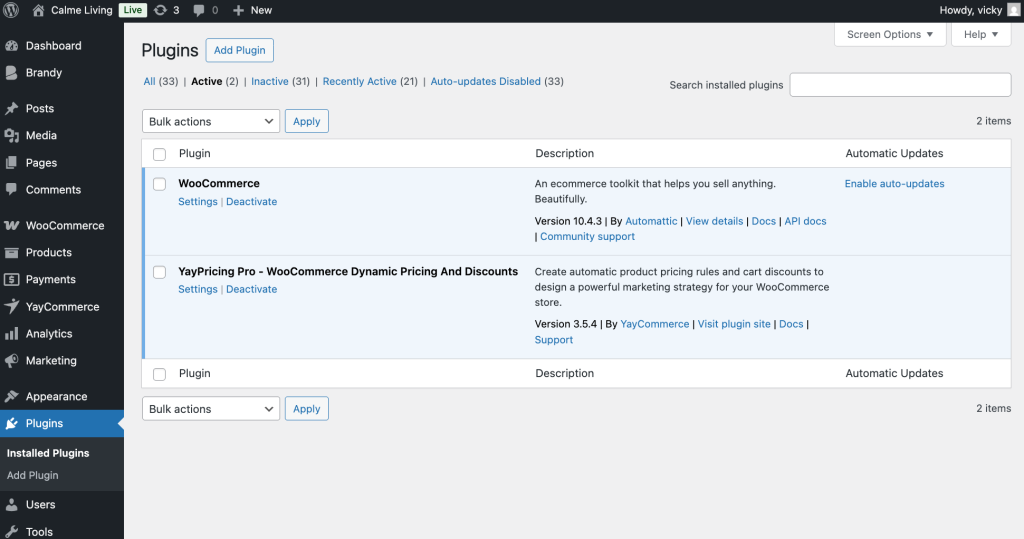
Once activated, you’ll find YayPricing under the WooCommerce menu.
Step 2: Create a New Pricing Rule for Coupon Code
Now, on your WordPress dashboard, head over to YayPricing to create a new rule for this discount campaign.
For example, the campaign is “Get 15% OFF all products with the Color attribute set to Pink when customers apply the Coupon Code.”
Since we have created a coupon code with a value of 0, we’ll configure the pricing rule.
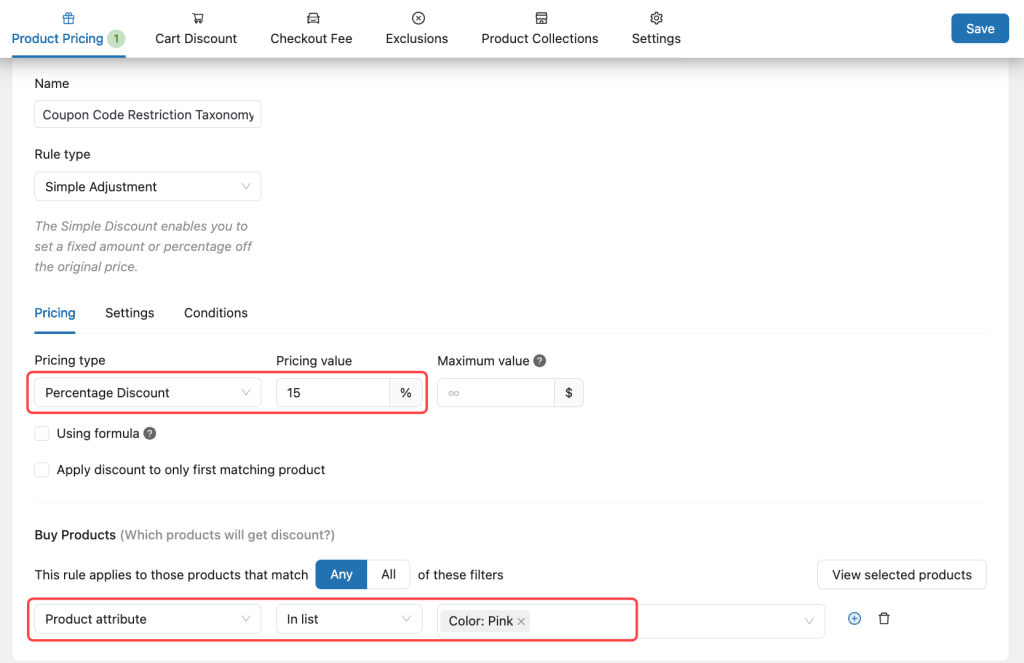
Then, slide to the Conditions tab to assign this discount value to the pre-built coupon code.
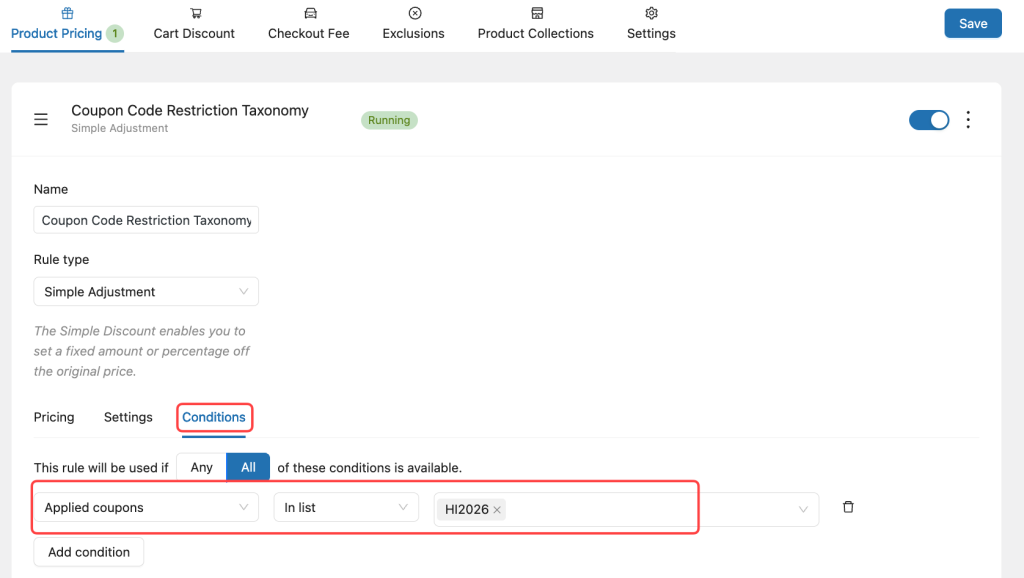
Save the settings, and the discount will now apply only to products that match those attributes.
Step 3: Show Customers Which Products Qualify
A great promotion is only effective if customers understand it immediately.
With YayPricing, you can:
- Show discount messages on product pages
- Show the sale badge to highlight eligible products
- Update prices dynamically in the cart
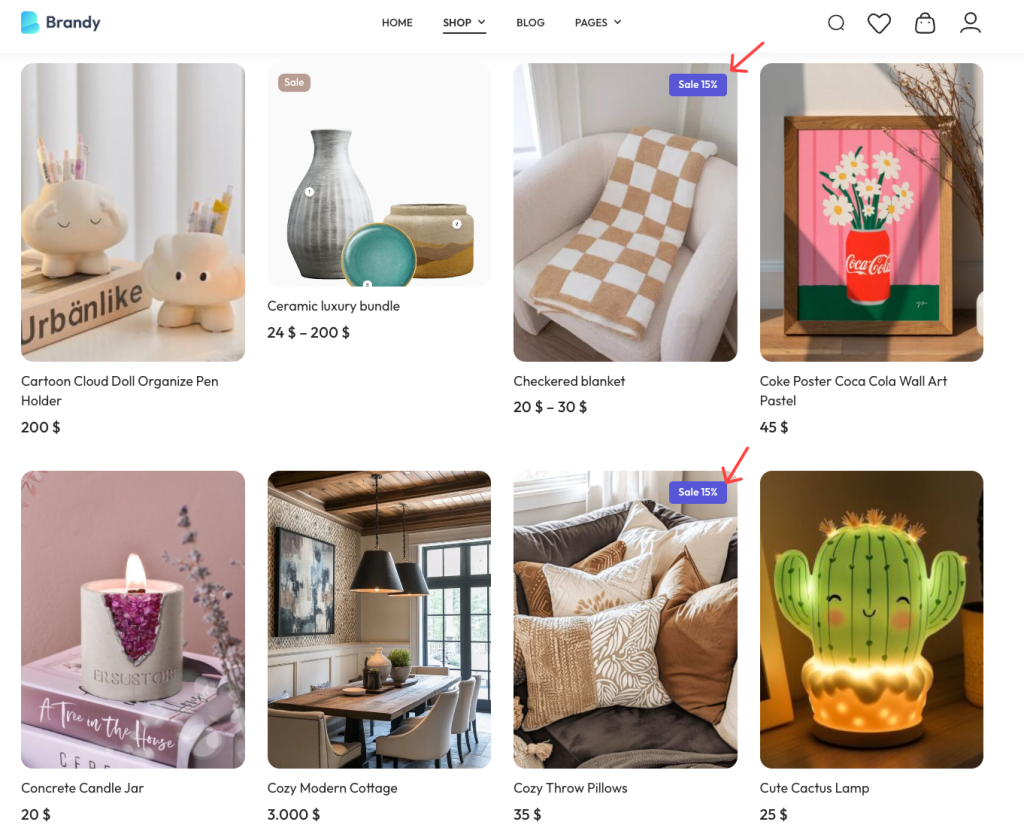
This transparency builds trust and encourages customers to add more qualifying items.
Step 4: Make a Purchase to Check Customer Experience
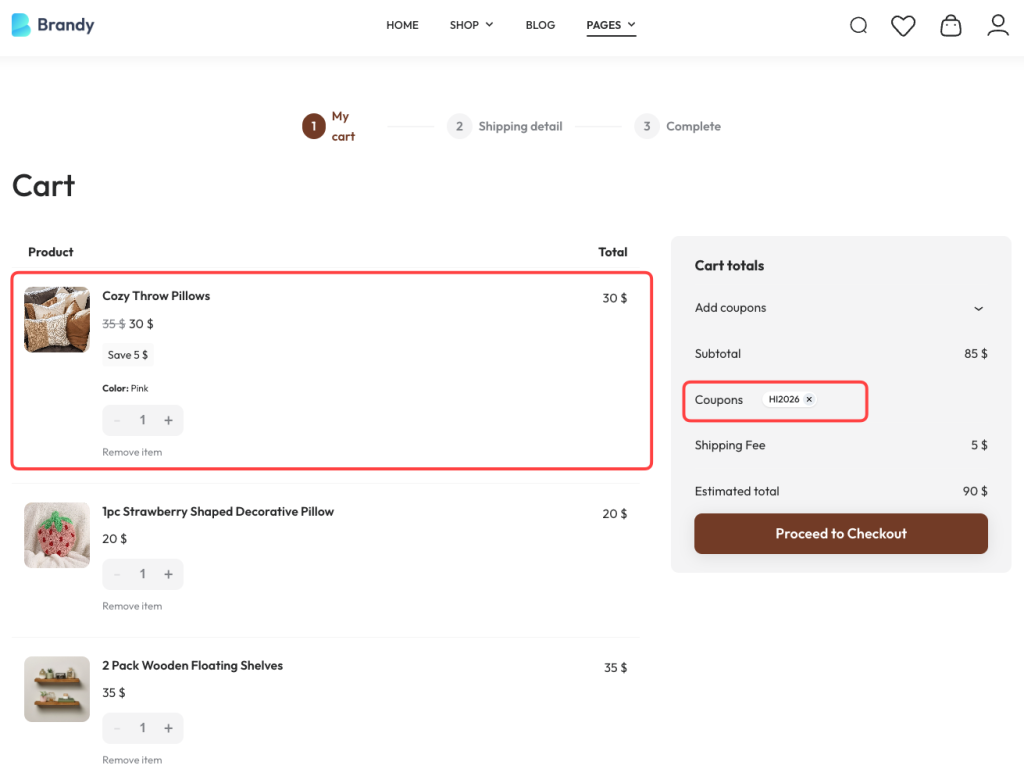
It’s time to check how this campaign works on a real WooCommerce store. Make sure to add only the correct product attributes to the cart. To make it clear, you can add another product, enter the coupon code, and see that only the product with the correct attribute is discounted.
Bonus: Advanced Strategies for Smarter WooCommerce Discount Based on Taxonomy
Most WooCommerce store owners think of discounts in simple terms: products, categories, or the entire cart. But once your store grows, more products, more variations, more customer segments, simple discounts stop being effective.
This is where taxonomy-based discount logic becomes one of the most powerful (and underused) tools in WooCommerce marketing.
Layer Multiple Taxonomies Together
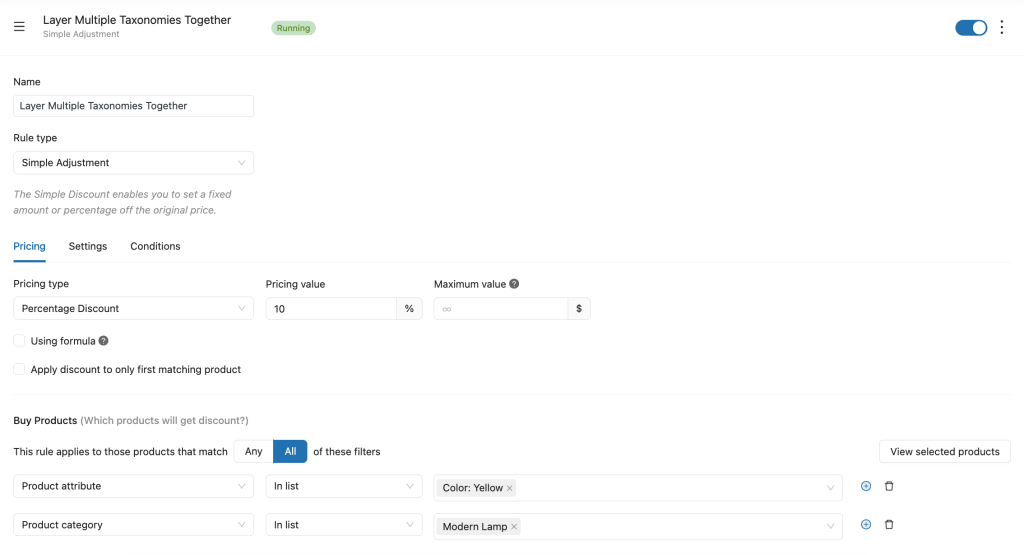
We want to create a discount rule as 10% OFF products that are:
- Category is Modern Lamp
- The attribute is yellow
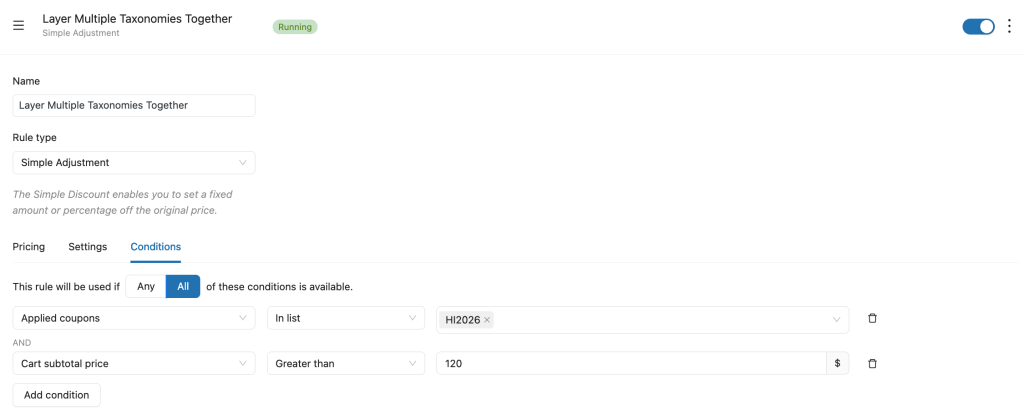
- The category subtotal is greater than $120
How to set it up with YayPricing
- Create a new discount rule
- Set the discount type: 10% discount off
- Add multiple taxonomies: category is Modern Lamp, the attribute is yellow, the category subtotal is greater than $120
- Apply the rule only when all conditions are met
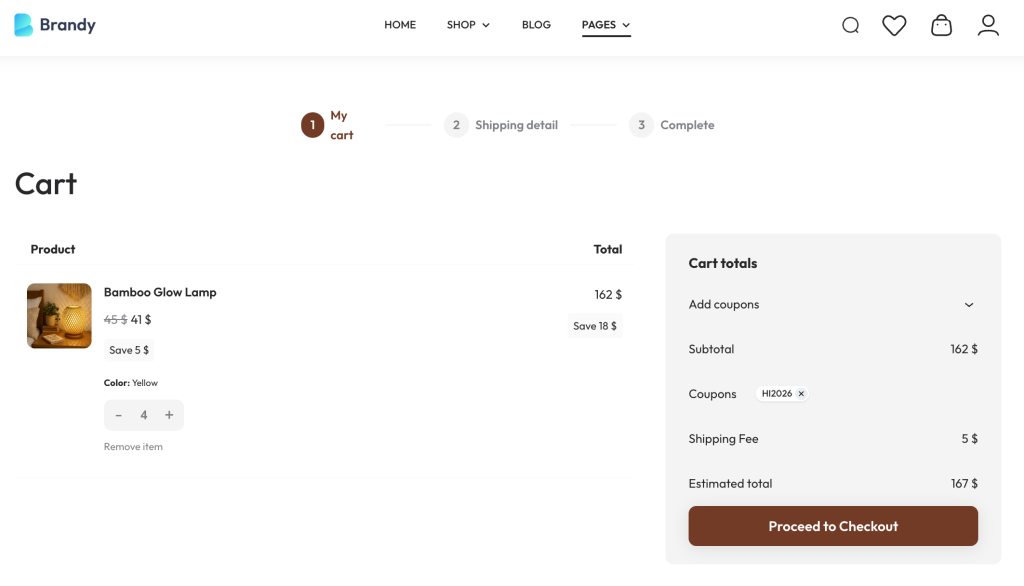
Now the discount isn’t just targeted – it’s revenue-driven.
Frequently Asked Questions
1. Can I create attribute-based discount coupons with default WooCommerce?
Not really. WooCommerce’s built-in coupon system doesn’t support targeting product attributes like color, size, or material. You can restrict coupons by product or category, but not by specific attribute values. That’s why a plugin like YayPricing is needed for attribute-based discount campaigns.
2. What types of product attributes can I use with YayPricing?
YayPricing works with global attributes created in WooCommerce, such as: Color, Size, Material, Style, Brand, etc. As long as the attribute exists as a taxonomy in WooCommerce, you can use it as a condition for your discount rules.
3. Can I schedule attribute-based promotions?
Yes. You can set start and end dates for your discount rules. This is perfect for:
- Seasonal campaigns
- Flash sales
- Limited-time promotions
Once the schedule ends, the discount stops automatically.
4. Will the discount apply only to matching variations?
Yes. When you set up an attribute-based rule in YayPricing, the discount applies only to products or variations that match the selected attribute values. Other variations remain at full price, which helps protect your profit margins.
If you want more control over where and how your discounts apply, taxonomy-based coupon restrictions are a game-changer.
With YayPricing, you can run smarter promotions that focus on the right products – without complicated setup or custom code.
Start Using YayPricing for Smarter Discounts
Continue learning how to build powerful WooCommerce promotions with these hand-picked guides:
- How to Set Up Restricted WooCommerce Discount Coupons Based on Advanced Quantity
- 4 Ways to Create Product Bundles for Your WooCommerce Store
- The Ultimate Guide to Advanced WooCommerce Coupon Restrictions
- How to Make WooCommerce Cheapest Cart Item Become Free
Want to explore more advanced WooCommerce strategies and tools? These YayCommerce resources are a great place to start: YouTube, Facebook. These resources are designed to help you get the most out of your WooCommerce store, whether you’re just starting or scaling up.
Final Thoughts
Attribute-based discounts are one of the most underused but powerful marketing tools in WooCommerce. They allow you to promote exactly what needs attention, without sacrificing profit on products that are already performing well.
With YayPricing, you don’t need complex setups or technical workarounds. You can create clean, controlled, and transparent promotions that feel intentional, both to you and your customers.
If you’re serious about running smarter WooCommerce campaigns, attribute-based discount rules are a game-changer. Start with one simple promotion, see how customers respond, and build from there.
Smarter discounts lead to better campaigns and better results.

Leave a Reply