


Do you want to create a WhatsApp link? In this post, we will show you how to create a WhatsApp link using one of the world’s best link generators!
Creating a WhatsApp link is one of the simplest ways to let people start a chat with your number without saving it first. A click-to-chat URL takes the standard wa.me format and turns your phone number into a direct chat link.
You can build it manually or use a WhatsApp link generator to handle the formatting and pre-filled message for you. The finished link works on mobile and desktop, can include a short message, and pairs well with a QR code for campaigns, websites, or social profiles.
Once you copy the link, anyone who taps it opens WhatsApp and lands in the conversation ready to send.
But before going further, let’s see why you need to create a WhatsApp link in the first place.
Why Do You Need to Create a WhatsApp Link
A WhatsApp link removes the extra steps that stop people from starting a conversation. Instead of asking visitors to save your WhatsApp number or type it manually, a click-to-chat link lets them open the chat directly from a website, email, or social profile.
Once the link is ready, anyone with the WhatsApp app installed can tap it and begin messaging you right away.
- A standard wa.me link turns your mobile number into a direct chat option. People can start a conversation without adding your contact first, which works especially well for business accounts that receive many inquiries.
- Click-to-chat links help you reach users across different devices. The same link opens correctly in the WhatsApp app on mobile devices and in WhatsApp Web in a browser, so visitors are not limited to a single platform.
- You can add a short pre-filled text message to the link. This saves the user time and makes it clear what the conversation is about when they click through from a campaign, email, or page.
- A short link is easier to share on social media platforms and in printed materials. You can also turn the same URL into a QR code so people can scan it and open the chat without typing anything.
- Creating the link does not require a login or special tools for basic use. You only need your WhatsApp number in the correct international format, including the country code, and the link will work immediately after you test it.
- For businesses, a WhatsApp click-to-chat feature makes customer contact simpler and more visible. The link can sit on your website, product pages, or ads, and it redirects the visitor straight into a ready conversation.
How to Create a WhatsApp Link and Share the URL
There are multiple online tools you can use to create a WhatsApp link (we will list some of the below). From there, we will pick wa.link.
It is one of the easy-to-use WhatsApp click to chat link generators. And it is free to use too.
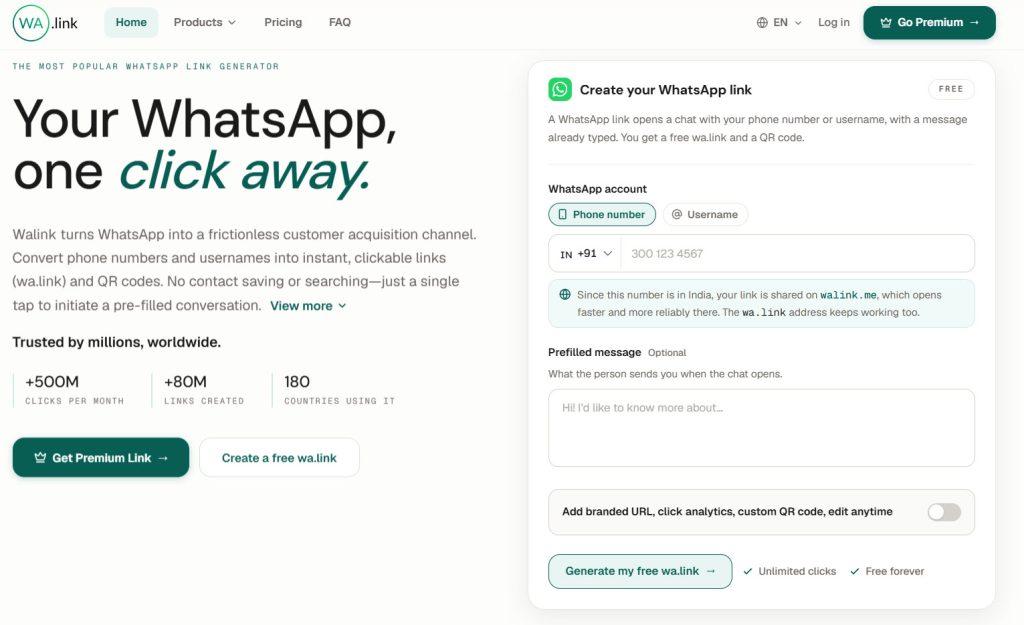
As you can see in the image on the right-hand side of the website, you will find the configuration to create your own WhatsApp link.
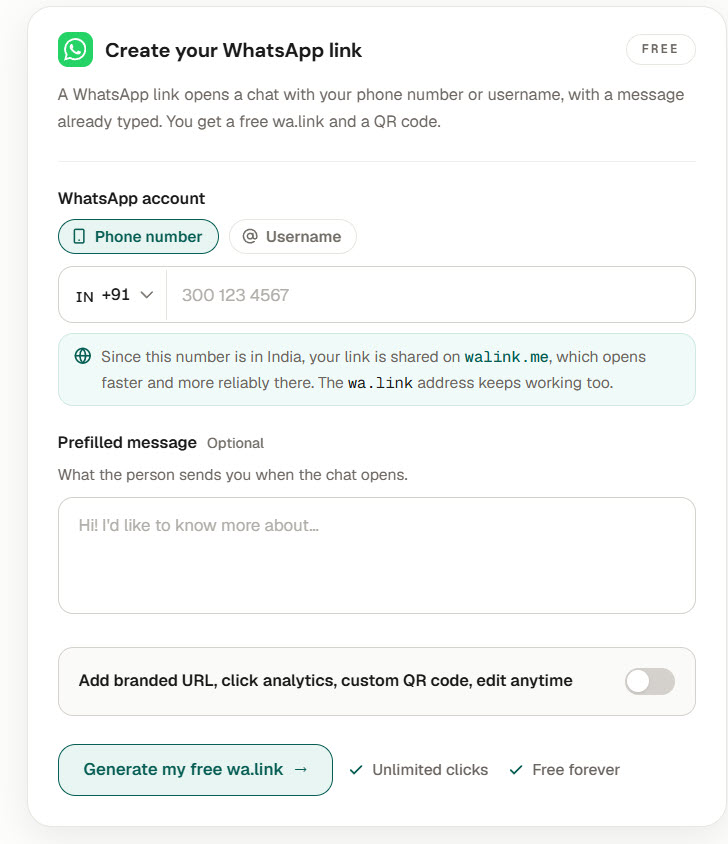
You can link it to your phone number or username. It is totally based on your preferences. If you choose the phone number method, you have to type in your mobile number. If you choose the username method, you have to enter your unique WhatsApp username.
Once you have entered it, move to the prefilled message section. Here, you can choose the message the user will be sending you.
If you are running an online store and this WhatsApp chat is for customer support, a message like “Hello, I need help choosing a product” might work well.
Once you are done with these options, generate your free link.
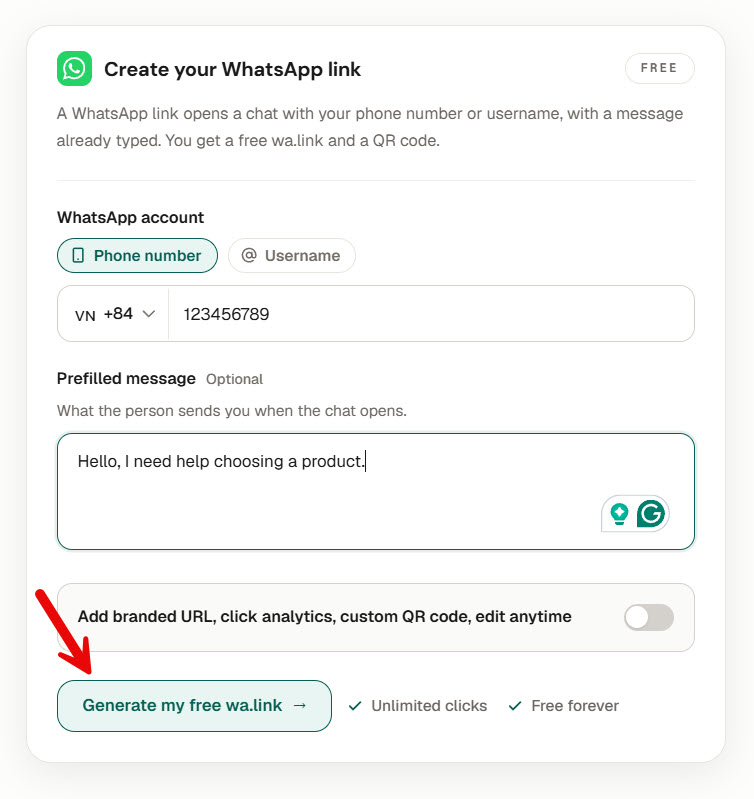
In a few seconds, the WhatsApp link and QR code will be generated.
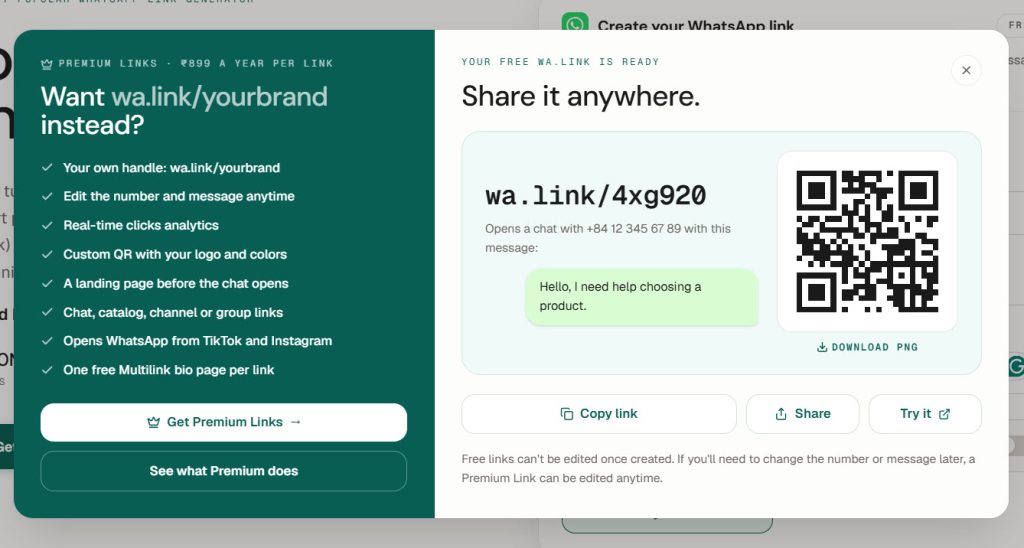
You can copy the link and share it with people or customers. The QR code will also redirect people to your support team’s WhatsApp account. As you can see, this is free and doesn’t cost a penny.
That’s it! This is how you can create WhatsApp link and share the URL with your friends or customers.
Best WhatsApp Link Generators
Common Mistakes to Avoid While Using a WhatsApp Link Generator
Most problems with a WhatsApp link stem from minor formatting errors that prevent the click-to-chat URL from working.
A generator speeds up link creation, but it still depends on the correct phone number and message input. Checking these details before you copy and share the link keeps the chat from failing for your visitors.
- Using the wrong phone number format is the most common error. The standard link needs your full international number with the country code and digits only, so a leading zero, dash, or space will break the wa.me link.
- Forgetting to test the finished URL before you use it. Always open the generated link on your own device to confirm it starts the correct conversation and that any pre-filled message appears as expected.
- Adding a pre-filled message that is too long or contains too many special characters. Long text or symbols that are not properly encoded can cause the click-to-chat link to fail or appear broken when someone taps it.
- Sharing the link without checking that WhatsApp is installed on the user’s device. On desktop, the link redirects to WhatsApp Web, but mobile users without the app will not be able to open the chat directly.
- Building the link with a personal WhatsApp number when you need a WhatsApp Business account. Business features such as short links and message templates work best when the number is set up as a business account.
- Copying the URL and pasting it without reviewing the label or button text. A clear label on your website or campaign page helps visitors understand they are about to start a WhatsApp click-to-chat conversation.
Frequently Asked Questions
Now, let’s take a look at some frequently asked questions and answers on this topic.
How do I create a WhatsApp link with my phone number?
You can create a WhatsApp link by using the standard wa.me format with your full international phone number. Most people use a WhatsApp link generator so the tool handles the correct format and any pre-filled message for them.
What is the standard link format for click-to-chat?
The standard link uses wa.me followed by your phone number in international format with digits only. This click-to-chat format works on both mobile and desktop, opening the conversation automatically when someone clicks the link.
Can I add a pre-filled message to click-to-chat links?
Yes, you can add a pre-filled message by including the text parameter in the URL. A WhatsApp link generator makes this easy, so the message appears ready to send when the link is clicked.
Do I need a special tool for link creation?
You do not need a special tool to create wa.me links, but a generator saves time on formatting. The tool simply builds the standard WhatsApp click-to-chat URL from your phone number and optional message.
Why is the phone number format important for WhatsApp click-to-chat?
The phone number must use the full international format without spaces, dashes, or leading zeros. If the format is wrong, the click-to-chat link will not open the correct conversation.
Are click-to-chat links useful for business?
Click-to-chat links are useful because they let visitors start a chat without first saving your number. You can place them on your website, in emails, or in campaigns so people can reach you with one click.
What happens when someone clicks the link?
Clicking the link opens WhatsApp or WhatsApp Web and starts a new conversation with your number. If you added a pre-filled message, it appears in the text field so the user only needs to hit send.
Can I use a short URL with WhatsApp click-to-chat?
Yes, many generators create a short URL from the standard link, making it easier to share. The short link still redirects to the same click-to-chat conversation when someone taps it.
Does the WhatsApp click-to-chat feature work on every device?
The feature works on mobile when the WhatsApp app is installed and on desktop through WhatsApp Web. You should test the link on both to confirm it opens correctly.
How do I test a WhatsApp link after link creation?
Open the finished URL on your own phone or browser to check that it starts the right chat. Testing also confirms that any pre-filled message shows up and that the phone number format is correct.
Conclusion
Creating a WhatsApp link is a simple way to turn your phone number into a direct click-to-chat URL.
With the standard wa.me format, you can build the link yourself or use a WhatsApp link generator to handle the formatting and pre-fill the message for you. Once the URL is ready, you can copy it to your website, add it to a campaign, or turn it into a QR code.
Anyone who taps the link opens WhatsApp and starts the conversation without first saving your contact.
The same link works on mobile and desktop, and a short URL makes it easier to share. Tools like wa.link make the process quick, but the core steps stay the same no matter which generator you choose.
Test the finished link, keep the phone number in the correct international format, and you will have a useful click-to-chat link that works every time someone needs to reach you.
Which tool would you use?
Let us know in the comments.

Leave a Reply